Engineering-led AI, automation & business systems · Edmonton, Alberta
Turn manual work into intelligent systems.
RootN finds the repetitive work inside your business (the re-keying, chasing, copying and reporting) and replaces it with the right system: AI, automation, a custom application, a dashboard or simply a better process.
A 30-minute call with the engineer who would build it. Reply within one business day.
Built so far A full operating system for an Edmonton upholstery studio · 60,000+ timesheets through one digital workflow, built as an engineer inside a heavy-civil contractor
Today · disconnected
- Request arrives by emailInbox
- Details retyped into a spreadsheetRetyped
- Copied again into the quote templateRetyped
- PDF built and emailed by handManual
- Report rebuilt from scratch on FridayManual
Five hand-offs, three copies of the same data, and nobody sure which one is current.
Connected · automated
- Request arrives by form or emailCaptured once
- AI reads it and fills in the recordAI
- Quote generated from that recordAutomated
- Customer approves onlineSelf-serve
- Dashboard updates itselfLive
One record from request to report. People handle the exceptions and the decisions.
Sound familiar?
Your business has probably outgrown some of the processes it still depends on.
It happens in every industry. The business grows, and the spreadsheets, inboxes and workarounds that got it here start costing more than anyone measures.
- The same information is typed into two or three places.Systems integration
- The inbox has become the to-do list.AI & document intelligence
- Quotes and invoices are assembled by hand from a template.Custom business systems
- The weekly report is rebuilt from scratch, every week.Data, dashboards & reporting
- A spreadsheet has quietly become the system everyone depends on.Custom business systems
- Only one person really knows how a key process works.Workflow automation
- Customers can’t easily request a quote, approve it or check on their job.Websites & customer experience
- PDFs and attachments are read, then re-typed by hand.AI & document intelligence
If your team is doing work that software should be doing, it can usually be automated, and we can show you what that would take.
Real work
Systems built around how real businesses operate.
An upholstery studio, two service brands and a heavy-civil equipment operation. If we can understand their workflows and build around them, we can probably understand yours.
Business system · Website
Sofa Art Upholstery: from paper, texts and PDFs to one operating system
A family-run upholstery studio ran on fillable PDF quotes, spreadsheets, paper work orders and text messages. RootN’s founder designed and built one system around how the shop actually works, from the first inquiry to the follow-up after delivery, alongside a new website.
- 60+
- screens across the staff app, the customer portal and reports
- 8
- staff roles, each seeing what it needs
- 32
- workflow steps tested end to end, inquiry to review request
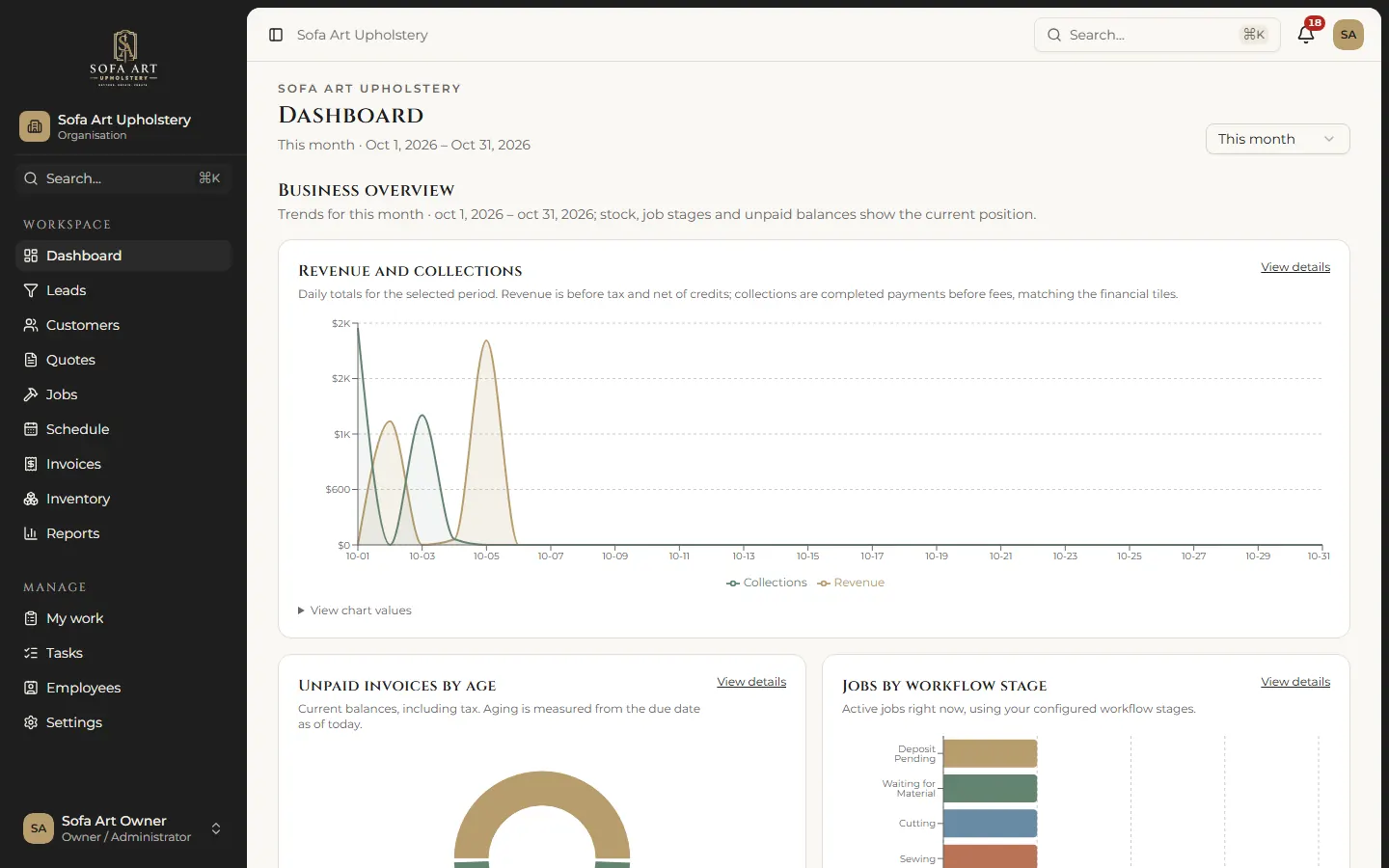
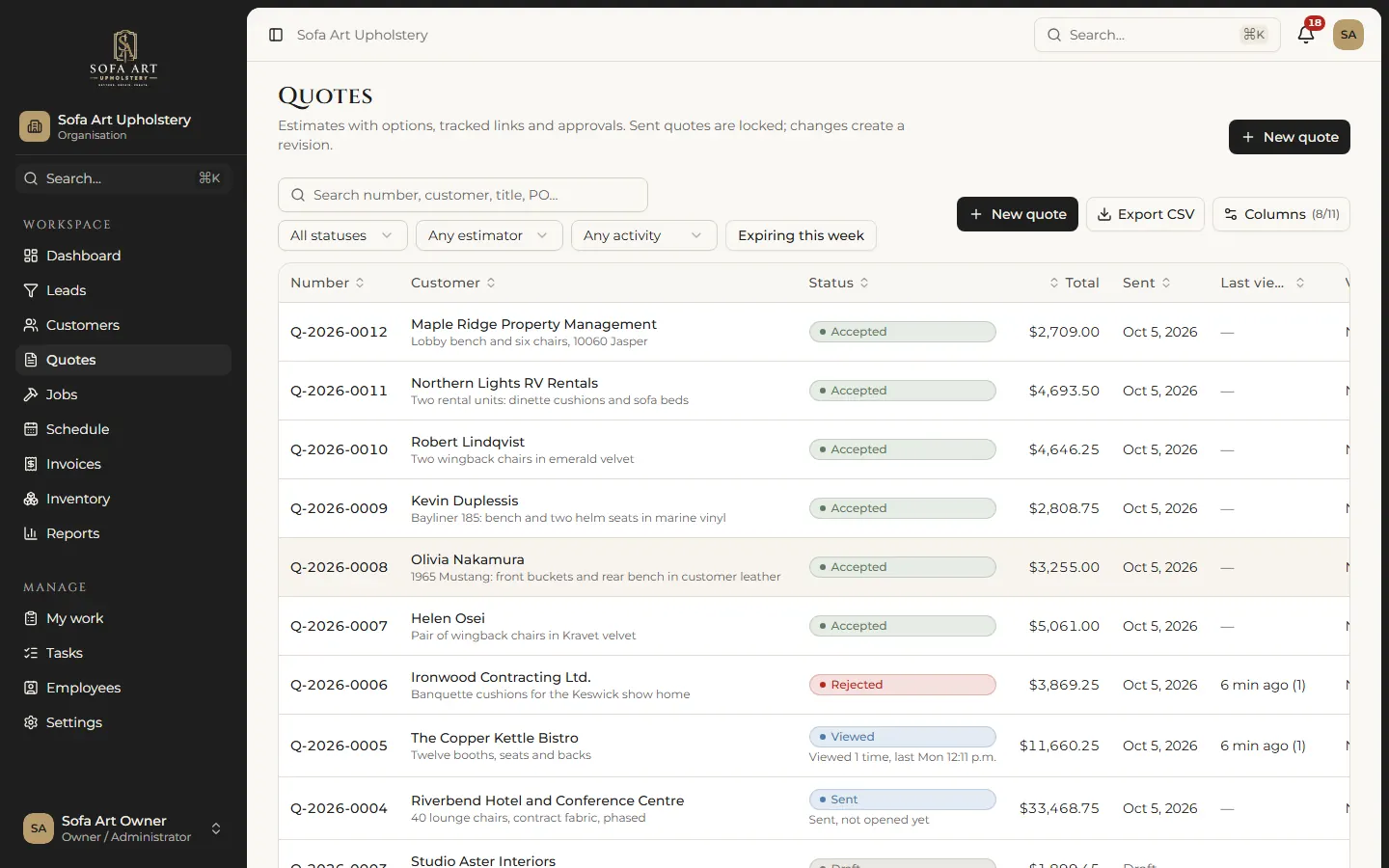
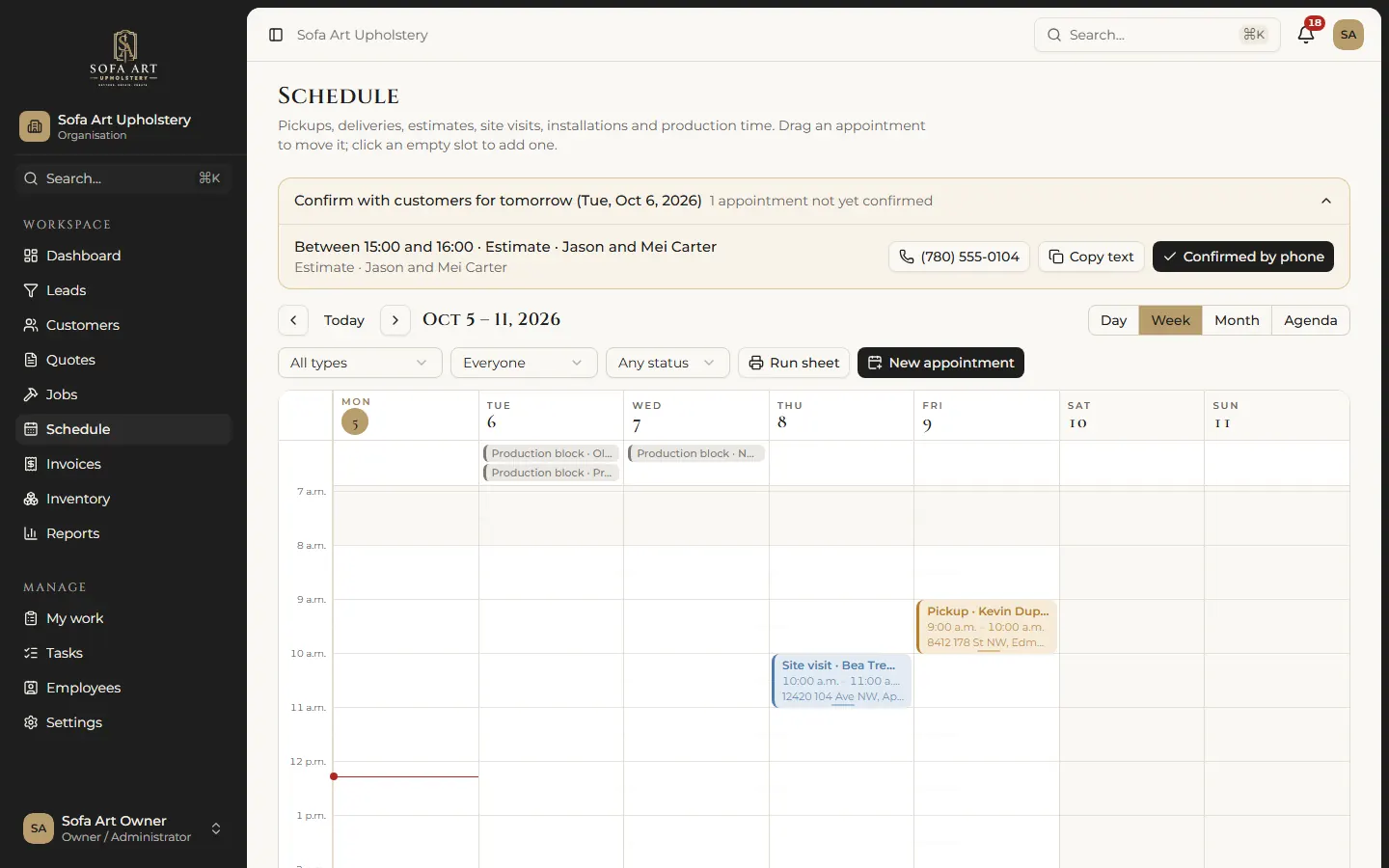

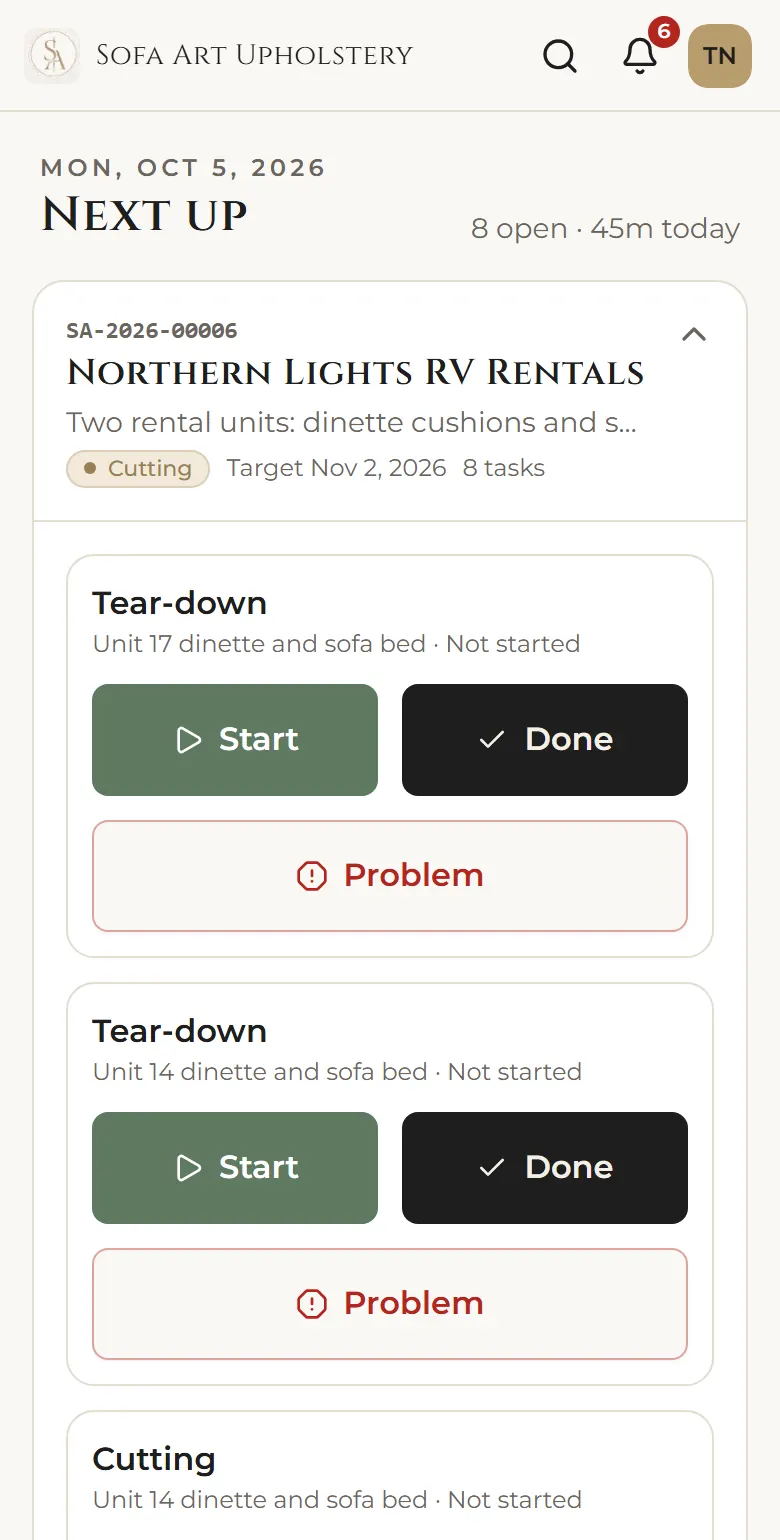
Real screens from the working application, run on a private copy with its fictional demo data: every customer, amount and date shown is sample data, not a real customer.
 Brand · Website · Quote intake
Haulor
A new service brand made credible from day one, with a quote request that asks the right questions.
Read the case study
Brand · Website · Quote intake
Haulor
A new service brand made credible from day one, with a quote request that asks the right questions.
Read the case study
 Brand · Website · Booking intake
Cleanore
Three kinds of customer, one clear booking path, and the service area answered before anyone has to ask.
Read the case study
Field notes · Inside a heavy-civil contractor
Timesheet, payroll, reporting and cost systems
60,000+ timesheets through one digital workflow, and a quarterly cost analysis cut from 2–3 weeks to about 6 hours.
Read the field notes
Brand · Website · Booking intake
Cleanore
Three kinds of customer, one clear booking path, and the service area answered before anyone has to ask.
Read the case study
Field notes · Inside a heavy-civil contractor
Timesheet, payroll, reporting and cost systems
60,000+ timesheets through one digital workflow, and a quarterly cost analysis cut from 2–3 weeks to about 6 hours.
Read the field notes
How the pieces connect
One connected system instead of five disconnected steps.
Every business is different, but connected operations share the same layers. Choose one to see what happens there, and where we have built it.
01 Customer
The system should make the customer’s part easy: one link to see a quote, choose an option, sign and see the deposit due, without a phone call.
Example In the Sofa Art system, customers open a secure link to view a quote, pick an option and sign.
02 Front door
Requests arrive with the details the next step needs, checked for spam and duplicates, instead of a free-text email someone has to decode.
Example Sofa Art’s system accepts website inquiries through a signed webhook: a customer, a lead and a follow-up task, created in one step.
03 Automation
The repetitive hand-offs (copy this, email that, remind them) run on their own, with alerts when something fails and a manual fallback where it matters.
Example Inside a heavy-civil contractor, a digital form and an automated flow handled 60,000+ timesheets: PDF built, saved and filed with no handling in between.
04 Business system
Customers, quotes, jobs, schedules and invoices in one place, shaped around how you actually operate, with permissions for each role.
Example Sofa Art’s operating system has more than 60 screens and separate views for the owner, office, estimators, the shop floor and drivers.
05 Database
One source of truth, so the history is trustworthy and reports agree with each other. Your data, in a standard database you can export.
Example Every Sofa Art record lives in standard PostgreSQL, and a single command exports a business’s data as JSON and CSV.
06 AI
Used where plain rules run out: reading varied documents and emails, pulling out the fields, drafting replies for a person to approve, answering questions about your own data.
Example Illustrative: a supplier email becomes a structured purchase record, and anything uncertain goes to a person to check.
07 Dashboards, actions, alerts
What is late, what is owed, what needs a decision, as a dashboard, a scheduled report or a nudge to the person who can act on it.
Example Sofa Art’s dashboard shows revenue against collections, unpaid invoices by age and jobs by workflow stage.
What we build
Outcomes first. The technology follows.
Sometimes the answer is AI. Sometimes it is a simple automation, a custom application, a dashboard or a better process. We recommend what fits, and say so when the answer is “not yet”.
Practical AI
AI that does real work inside your systems.
Most business information still arrives as text: emails, PDFs, forms, notes. AI can read it, pull out what matters and turn it into structured work, with a person checking anything uncertain.
- Turn emails into structured work
- Extract data from documents
- Route requests by what they say
- Draft replies and documents
- Answer questions about your own knowledge
Arrives as text
Supplier · Order update
Hi, confirming your order of 3 rolls of the charcoal performance fabric (54").
Two rolls ship Thursday; the third is backordered about two weeks.
Invoice 4471 to follow. Please quote the job reference on payment.
Becomes structured work
- Type
- Order confirmation
- Item
- Charcoal performance fabric, 54"
- Quantity
- 3 rolls
- Shipping
- 2 rolls Thursday, 1 backordered (~2 weeks)
- Invoice
- 4471 (to follow)
- AutomaticMaterial record updated
- AutomaticJob flagged: waiting for material
- A person approvesCustomer delay message drafted
How we think
Understand the business first. Build the right technology second.
We don’t show up and start writing code. We find out how the work really runs, remove what shouldn’t exist, then build only what pays for itself.
- 01
Understand
How the work really runs today, who touches it, and what it costs.
- 02
Map
Every hand-off, copy and wait, drawn out and timed.
- 03
Simplify
Remove the steps that shouldn’t exist before automating anything.
- 04
Build
The right tool for each step: a rule, a flow, an application, AI or nothing at all.
- 05
Measure
The same measure before and after, so the result is a number, not an opinion.
- 06
Improve
Hand it over documented, then tune it as the business changes.
Across industries
Different businesses. The same patterns.
The industry changes the vocabulary, not the problem. These are the patterns we see most.
Request → quote → job → invoice
Upholstery and repair shops, contractors, home and field services, fabrication
One system from first inquiry to paid invoice, with online approval and a job board
Field paperwork → office
Construction crews, cleaning and maintenance teams, inspectors, drivers
Phone forms, generated PDFs, automatic filing and approvals
Documents in → data out
Professional services, property management, logistics, suppliers and accounts payable
AI extraction with a review queue, routing by content, records created in your system
Scattered data → one report
Manufacturing, equipment fleets, multi-site operations, growing companies
Scheduled data pulls, agreed definitions and dashboards that refresh themselves
Customer front door
Local and growing service businesses
A credible brand and website with structured quote requests that feed the next step
Where the approach comes from
Shaped where bad processes have real consequences.
RootN’s approach was formed inside a heavy-civil contractor’s equipment operation, where disconnected data, crews, machines and maintenance decisions cost real money. We bring the same systems thinking to businesses well outside heavy industry.
Read the five field notesSystems built by RootN’s founder inside a Western Canadian heavy-civil contractor’s equipment operation. The employer and its systems are not named.
We find inefficient work inside businesses and build technology that eliminates, automates, connects or improves it.
Who you’ll work with
The engineer who designs it is the one who builds it.
RootN’s founder builds the systems on this site: from automations inside a heavy-civil operation to a full operating system for a local business.
There is no hand-off from a salesperson to a junior developer. The first call, the diagnostic and the build are with the same person, who understands both the operation and the code.
About RootNBefore you book
The questions people ask first.
We’re not an industrial business. Is RootN for us?
Yes. The problems are the same across industries: information typed twice, approvals chased by email, reports rebuilt by hand. The Sofa Art system was built for an upholstery studio. The industrial background is where the approach was shaped, not a limit on who we work with.
Do we need AI?
Not always. We start with the work, not the technology. Sometimes the answer is AI, sometimes a simple automation, a custom application, a dashboard or a better process.
RootN is one engineer. What happens if you’re unavailable?
The work is designed not to depend on us. It is built in your environment wherever possible, under service accounts rather than a person’s login, documented as we go, with a manual fallback for anything payroll- or billing-critical. You own the code, flows and data, so your team or another developer can pick it up. And you always deal directly with the engineer who builds it.
Who owns what you build?
You do: code, flows, data and documentation. Nothing is locked to RootN.
How do you handle our data?
We work in your systems with service accounts, use a separate MFA-protected account removed at handover, keep secrets in your vault, sign NDAs and complete security questionnaires. AI data use is agreed in writing first.
What does it cost to start?
The first call is free. A diagnostic is a fixed price agreed before we start, from $1,500, and it is credited to the build if you go ahead within 60 days.
Next step
Show us what’s slowing your business down.
Bring one process that eats time. In 30 minutes we’ll look at how it runs today, what it costs, and whether AI, automation or a better process would fix it. You leave with one concrete next step, even if it isn’t with us.
With the engineer who would do the work. Reply within one business day.